Comparison
TSC DA210 vs DA220: which direct thermal printer to buy
Same speed, body and 203 dpi print. The DA220 adds 128 MB flash, Ethernet, RS-232, Wi-Fi options and support for a peeler or cutter.

In this guide
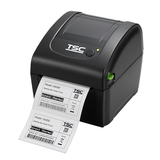
The DA210 and DA220 share the same body, print engine and speed: 203 dpi direct thermal at up to 152 mm/s, 108 mm print width, one LED and one button. The difference is inside. The DA220 has much more memory, network and serial interfaces, and support for a peeler, cutter and linerless kits. Choose the DA210 for one PC over USB. Choose the DA220 for networked, shared or stand-alone printing, or when you need a cutter or peeler.
| DA210 | DA220 | |
|---|---|---|
| Interfaces | USB 2.0 | Standard board: USB 2.0, USB host, RS-232, Ethernet; or USB 2.0 and Ethernet board (factory option) |
| Wireless (factory options) | Bluetooth or MFi Bluetooth | Wi-Fi 802.11 a/b/g/n, Bluetooth or MFi Bluetooth |
| Memory | 8 MB flash, 16 MB DRAM | 128 MB flash, 64 MB DRAM |
| Max print length | 2,794 mm | 25,400 mm |
| Media handling options | None listed by TSC (tear-off) | Peeler, guillotine cutter (full or partial cut), linerless with tear, cutter or enhanced cutter |
| Other options | Real-time clock not offered | Real-time clock (factory option), KP-200 Plus keyboard display unit |
| Print method | Direct thermal only | Same |
| Resolution | 203 dpi (8 dots/mm) | Same |
| Max print speed | 152 mm/s (6 ips) | Same |
| Max print width | 108 mm | Same |
| Media width | 19–114 mm | Same |
| Roll size and cores | 127 mm diameter; 25.4–38 mm cores | Same |
| Sensors | Gap, black mark, head open | Same |
| Controls | Power switch, one button, one 3-colour LED; no display | Same |
| Printer language | TSPL-EZD (compatible with EPL, ZPL, ZPL II, DPL) | Same |
| Size and weight | 172 × 165 × 195 mm (W × H × D), 1.5 kg | Same |
Figures from TSC's DA Series datasheet and user manual. The 300 dpi versions are the DA310 and DA320 (up to 102 mm/s).
Choose the DA210 if
- The printer sits next to one computer and connects by USB
- You print shipping, product or office labels from a PC or label software
- You tear labels off by hand and need no cutter or peeler
- You want the lowest cost per printer
Choose the DA220 if
- Several users print to it over Ethernet or Wi-Fi
- You connect it by RS-232, or to a keyboard unit for stand-alone printing
- You store fonts, graphics or label formats in the printer
- You want labels peeled or cut, or print linerless labels
What both printers share
TSC covers both models in one user manual, so loading, calibration and troubleshooting are the same. Both calibrate with the FEED button at switch-on, and both are managed with TSC's free TSC Console. They take the same labels, the optional 1.5 in core adapters and the external roll mount for 214 mm rolls on 76.2 mm cores. Neither uses a ribbon. Our DA210/DA220 setup guide and calibration guide apply to both.
DA220 versions and options
TSC builds the DA220 in several versions. The interface board, Wi-Fi and Bluetooth are factory options, so they cannot be added later. The interfaces of each version we sell are listed on its product page. TSC's user manual and datasheet list the peeler, cutter and linerless kits as dealer options for the DA220 only.
Note
For Europe, TSC ships network-capable printers with the PRTSecure security mode set to Strict, which blocks setup over the network. Before the first network connection, connect the DA220 by USB and set the security mode to Standard in TSC Console. The DA210 has no Ethernet or Wi-Fi, so the network block does not affect it.
Frequently asked questions
Is the TSC DA220 faster than the DA210?
No. Both print at up to 152 mm/s (6 ips) at 203 dpi. The DA220 adds memory, interfaces and options, not speed.
Can I add Ethernet or Wi-Fi to a DA210 later?
No. The DA210 is USB only, with Bluetooth as a factory option. For Ethernet or Wi-Fi, choose a DA220 version that has it.
Do the DA210 and DA220 use the same labels?
Yes. Both take direct thermal labels 19–114 mm wide on rolls up to 127 mm in diameter.
Can the DA210 or DA220 replace a Zebra printer?
Both run TSPL-EZD, which TSC lists as compatible with EPL, ZPL, ZPL II and DPL. TSC designed this to make replacing older printers easier; test your own label formats before you switch.
Was this guide helpful?
More DA210 guides
Still stuck?
Contact support
Send us your model and a short description of the problem. Our team will help you find a solution.